> ## Documentation Index
> Fetch the complete documentation index at: https://docs-dev-actions-transaction-metadata.mintlify.site/llms.txt
> Use this file to discover all available pages before exploring further.

> Learn how to configure an update policy form using Forms for Actions for users to review and accept new terms of service or consent updates.

# Use Cases: Configure an update policy form using Forms

<Card title="Before you start">
  1. Create a [Machine-to-Machine Application](/docs/get-started/auth0-overview/create-applications/machine-to-machine-apps) with the following scopes enabled:

  * `read:users`
  * `update:users`
  * `create:users`
  * `read:users_app_metadata`
  * `update:users_app_metadata`
  * `create:users_app_metadata`

  2. Add a [Vault connection](/docs/customize/forms/vault) using the M2M application credentials.
</Card>

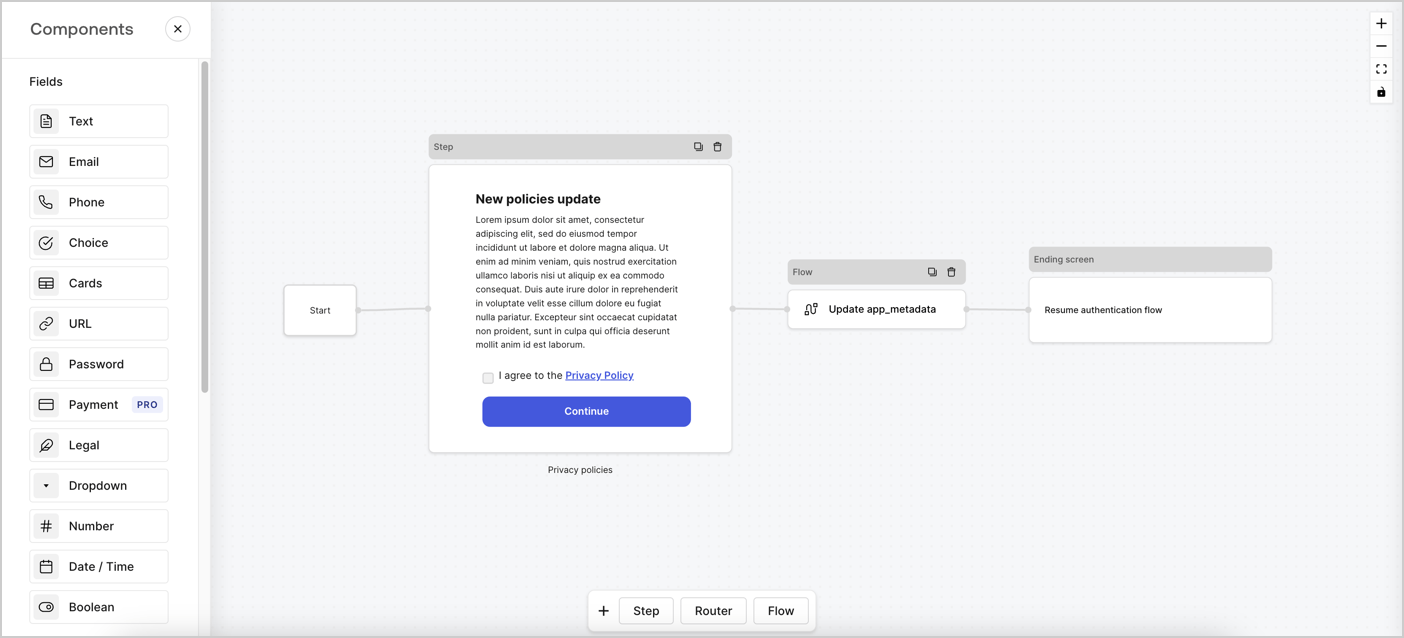
Forms for Actions allows you to create custom privacy policies flows and store the consent under the `app_metadata` object.
<Frame>
  <img src="https://mintcdn.com/docs-dev-actions-transaction-metadata/o_NiAeZoAP9pt8fk/docs/images/cdy7uua7fh8z/6i68dMvHDTijfRmSgN1x8Q/ad900e7d4c0fb34645921435472b8684/privavy-policy-form.png?fit=max&auto=format&n=o_NiAeZoAP9pt8fk&q=85&s=640930a6c05f06bbe9748c84b6549b50" alt="Dashboard > Actions > Forms > Privacy policy use case" data-og-width="1404" width="1404" data-og-height="638" height="638" data-path="docs/images/cdy7uua7fh8z/6i68dMvHDTijfRmSgN1x8Q/ad900e7d4c0fb34645921435472b8684/privavy-policy-form.png" data-optimize="true" data-opv="3" srcset="https://mintcdn.com/docs-dev-actions-transaction-metadata/o_NiAeZoAP9pt8fk/docs/images/cdy7uua7fh8z/6i68dMvHDTijfRmSgN1x8Q/ad900e7d4c0fb34645921435472b8684/privavy-policy-form.png?w=280&fit=max&auto=format&n=o_NiAeZoAP9pt8fk&q=85&s=f63154019074179664b8290708c5e1ef 280w, https://mintcdn.com/docs-dev-actions-transaction-metadata/o_NiAeZoAP9pt8fk/docs/images/cdy7uua7fh8z/6i68dMvHDTijfRmSgN1x8Q/ad900e7d4c0fb34645921435472b8684/privavy-policy-form.png?w=560&fit=max&auto=format&n=o_NiAeZoAP9pt8fk&q=85&s=cd4bdc129cdda00ece5136386fa54574 560w, https://mintcdn.com/docs-dev-actions-transaction-metadata/o_NiAeZoAP9pt8fk/docs/images/cdy7uua7fh8z/6i68dMvHDTijfRmSgN1x8Q/ad900e7d4c0fb34645921435472b8684/privavy-policy-form.png?w=840&fit=max&auto=format&n=o_NiAeZoAP9pt8fk&q=85&s=ebdbe79091a4d4ae6669591b04c1ea93 840w, https://mintcdn.com/docs-dev-actions-transaction-metadata/o_NiAeZoAP9pt8fk/docs/images/cdy7uua7fh8z/6i68dMvHDTijfRmSgN1x8Q/ad900e7d4c0fb34645921435472b8684/privavy-policy-form.png?w=1100&fit=max&auto=format&n=o_NiAeZoAP9pt8fk&q=85&s=5d607038a9afd55ca0b82a6cb2d80ba9 1100w, https://mintcdn.com/docs-dev-actions-transaction-metadata/o_NiAeZoAP9pt8fk/docs/images/cdy7uua7fh8z/6i68dMvHDTijfRmSgN1x8Q/ad900e7d4c0fb34645921435472b8684/privavy-policy-form.png?w=1650&fit=max&auto=format&n=o_NiAeZoAP9pt8fk&q=85&s=76900ce3c0edc45c2f51649bc3fa023b 1650w, https://mintcdn.com/docs-dev-actions-transaction-metadata/o_NiAeZoAP9pt8fk/docs/images/cdy7uua7fh8z/6i68dMvHDTijfRmSgN1x8Q/ad900e7d4c0fb34645921435472b8684/privavy-policy-form.png?w=2500&fit=max&auto=format&n=o_NiAeZoAP9pt8fk&q=85&s=295fa61c5bafabbcaa40276d4f0f52a5 2500w" />
</Frame>

The sections below outline how you can create an Update Policy form using nodes and flows, along with steps for adding your form to a [Post Login](/docs/customize/actions/explore-triggers/signup-and-login-triggers/login-trigger) Action.

## Create a form from scratch

Follow these steps to create a form to gather information:

1. Open the Form editor by selecting **Auth0 Dashboard > Actions > Forms.**
2. Select **Create Form** > **Start from scratch**.

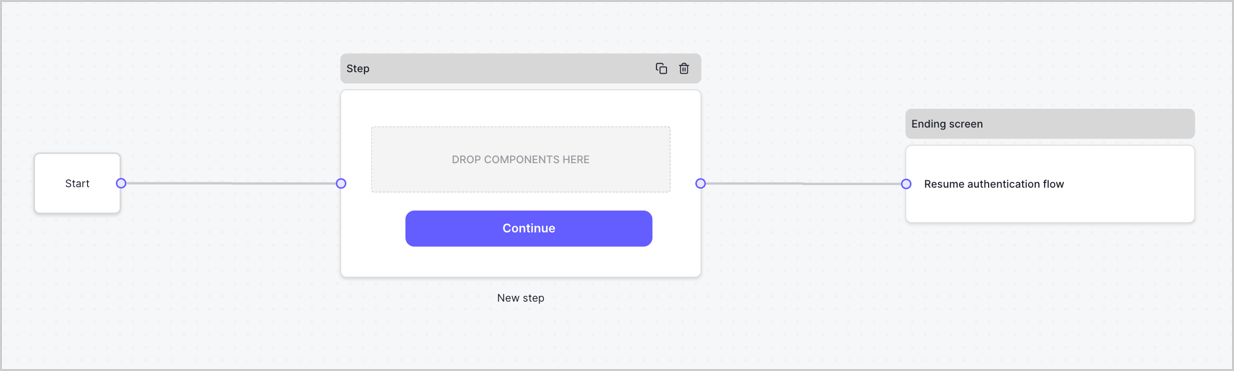
By default, a new form contains a Start node, a Step node, and an Ending screen node.
<Frame>
  <img src="https://mintcdn.com/docs-dev-actions-transaction-metadata/kOTVS7yc_4JzQxSU/docs/images/cdy7uua7fh8z/2TZ9jSjgEcARFpULI6hz4R/a4319a1bd482f2ee5cc23100fdb2f42c/New-form-Forms-for-action-use-case.png?fit=max&auto=format&n=kOTVS7yc_4JzQxSU&q=85&s=8fc64ed28fe5ff41629e4d0017eed472" alt="Dashboard > Forms > Use Cases > Form" data-og-width="1234" width="1234" data-og-height="371" height="371" data-path="docs/images/cdy7uua7fh8z/2TZ9jSjgEcARFpULI6hz4R/a4319a1bd482f2ee5cc23100fdb2f42c/New-form-Forms-for-action-use-case.png" data-optimize="true" data-opv="3" srcset="https://mintcdn.com/docs-dev-actions-transaction-metadata/kOTVS7yc_4JzQxSU/docs/images/cdy7uua7fh8z/2TZ9jSjgEcARFpULI6hz4R/a4319a1bd482f2ee5cc23100fdb2f42c/New-form-Forms-for-action-use-case.png?w=280&fit=max&auto=format&n=kOTVS7yc_4JzQxSU&q=85&s=bbccf84b30d52c55202dd4a51411d25e 280w, https://mintcdn.com/docs-dev-actions-transaction-metadata/kOTVS7yc_4JzQxSU/docs/images/cdy7uua7fh8z/2TZ9jSjgEcARFpULI6hz4R/a4319a1bd482f2ee5cc23100fdb2f42c/New-form-Forms-for-action-use-case.png?w=560&fit=max&auto=format&n=kOTVS7yc_4JzQxSU&q=85&s=053e435378a609d650c382da4eaf480f 560w, https://mintcdn.com/docs-dev-actions-transaction-metadata/kOTVS7yc_4JzQxSU/docs/images/cdy7uua7fh8z/2TZ9jSjgEcARFpULI6hz4R/a4319a1bd482f2ee5cc23100fdb2f42c/New-form-Forms-for-action-use-case.png?w=840&fit=max&auto=format&n=kOTVS7yc_4JzQxSU&q=85&s=5bbad93bbb557174697f95c988984fef 840w, https://mintcdn.com/docs-dev-actions-transaction-metadata/kOTVS7yc_4JzQxSU/docs/images/cdy7uua7fh8z/2TZ9jSjgEcARFpULI6hz4R/a4319a1bd482f2ee5cc23100fdb2f42c/New-form-Forms-for-action-use-case.png?w=1100&fit=max&auto=format&n=kOTVS7yc_4JzQxSU&q=85&s=b451670420607a2d2a3a3bab7c6071c9 1100w, https://mintcdn.com/docs-dev-actions-transaction-metadata/kOTVS7yc_4JzQxSU/docs/images/cdy7uua7fh8z/2TZ9jSjgEcARFpULI6hz4R/a4319a1bd482f2ee5cc23100fdb2f42c/New-form-Forms-for-action-use-case.png?w=1650&fit=max&auto=format&n=kOTVS7yc_4JzQxSU&q=85&s=4261147351fe4bb1f3e46e52827e031f 1650w, https://mintcdn.com/docs-dev-actions-transaction-metadata/kOTVS7yc_4JzQxSU/docs/images/cdy7uua7fh8z/2TZ9jSjgEcARFpULI6hz4R/a4319a1bd482f2ee5cc23100fdb2f42c/New-form-Forms-for-action-use-case.png?w=2500&fit=max&auto=format&n=kOTVS7yc_4JzQxSU&q=85&s=166c8111cbe4f702b5bdcdc2949ee744 2500w" />
</Frame>

### Configure the Step node

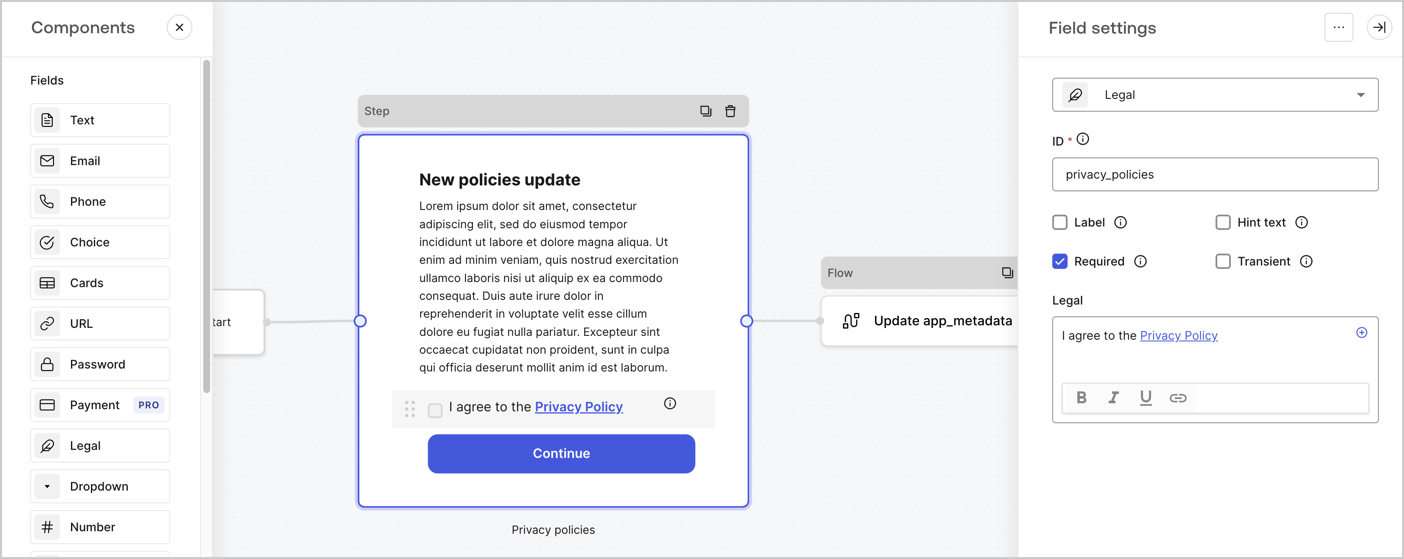
The Step node is the graphical interface visible to users. Add [Fields](/docs/customize/forms/nodes-and-components) to the Step node to collect the new agreement acceptance value by following these steps:

1. Drag a **Rich text** field from the **Components menu** into the **Step** node.

   * **Rich text**: Enter a description of your privacy policies updates.
   * Select **Save**.
2. Drag a **Legal** field into the **Step** node.

   * **ID**: Enter `privacy_policies`.
   * **Required**: Enable the checkbox.
   * **Legal**: Enter `I agree to the Privacy Policy`.
   * Select **Save**.
3. Select **Publish** to save.
<Frame>
  <img src="https://mintcdn.com/docs-dev-actions-transaction-metadata/f_xmeCNeZ1uHXRsO/docs/images/cdy7uua7fh8z/59zFFjQjAnjogkc2QGIqqJ/0ad66b1b636544122aa4e65968b76c2c/privacy-policy-step-node.png?fit=max&auto=format&n=f_xmeCNeZ1uHXRsO&q=85&s=78e273f8476fdec008aac0c4bde0a911" alt="Dashboard > Actions > Forms > Use case privacy policy step node" data-og-width="1404" width="1404" data-og-height="559" height="559" data-path="docs/images/cdy7uua7fh8z/59zFFjQjAnjogkc2QGIqqJ/0ad66b1b636544122aa4e65968b76c2c/privacy-policy-step-node.png" data-optimize="true" data-opv="3" srcset="https://mintcdn.com/docs-dev-actions-transaction-metadata/f_xmeCNeZ1uHXRsO/docs/images/cdy7uua7fh8z/59zFFjQjAnjogkc2QGIqqJ/0ad66b1b636544122aa4e65968b76c2c/privacy-policy-step-node.png?w=280&fit=max&auto=format&n=f_xmeCNeZ1uHXRsO&q=85&s=445f66c4662a6914b93820d28541fb5e 280w, https://mintcdn.com/docs-dev-actions-transaction-metadata/f_xmeCNeZ1uHXRsO/docs/images/cdy7uua7fh8z/59zFFjQjAnjogkc2QGIqqJ/0ad66b1b636544122aa4e65968b76c2c/privacy-policy-step-node.png?w=560&fit=max&auto=format&n=f_xmeCNeZ1uHXRsO&q=85&s=5204a8fe87fc5bdad154609a4e7abe75 560w, https://mintcdn.com/docs-dev-actions-transaction-metadata/f_xmeCNeZ1uHXRsO/docs/images/cdy7uua7fh8z/59zFFjQjAnjogkc2QGIqqJ/0ad66b1b636544122aa4e65968b76c2c/privacy-policy-step-node.png?w=840&fit=max&auto=format&n=f_xmeCNeZ1uHXRsO&q=85&s=95cea20a4d1e2bfd06307a356edf0545 840w, https://mintcdn.com/docs-dev-actions-transaction-metadata/f_xmeCNeZ1uHXRsO/docs/images/cdy7uua7fh8z/59zFFjQjAnjogkc2QGIqqJ/0ad66b1b636544122aa4e65968b76c2c/privacy-policy-step-node.png?w=1100&fit=max&auto=format&n=f_xmeCNeZ1uHXRsO&q=85&s=c1f243edfc6bb2a2d0bacc0471052bd9 1100w, https://mintcdn.com/docs-dev-actions-transaction-metadata/f_xmeCNeZ1uHXRsO/docs/images/cdy7uua7fh8z/59zFFjQjAnjogkc2QGIqqJ/0ad66b1b636544122aa4e65968b76c2c/privacy-policy-step-node.png?w=1650&fit=max&auto=format&n=f_xmeCNeZ1uHXRsO&q=85&s=a58ae964df8b4f5cf79510779ebd4ea9 1650w, https://mintcdn.com/docs-dev-actions-transaction-metadata/f_xmeCNeZ1uHXRsO/docs/images/cdy7uua7fh8z/59zFFjQjAnjogkc2QGIqqJ/0ad66b1b636544122aa4e65968b76c2c/privacy-policy-step-node.png?w=2500&fit=max&auto=format&n=f_xmeCNeZ1uHXRsO&q=85&s=df475aaee275bb3027784e3a571c8f3b 2500w" />
</Frame>

### Configure the Flow node

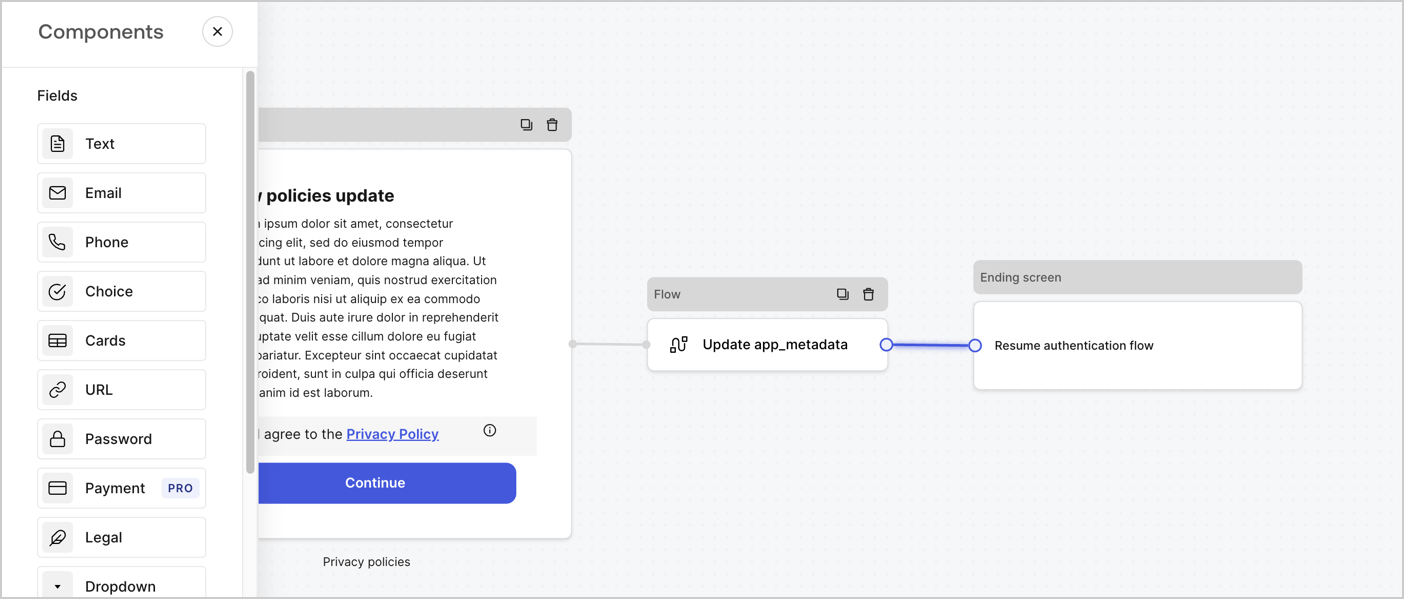
Add a **Flow** node after the **Step** node to update the `app_metadata` and resume the authentication flow by following these steps:

1. Select **Flow** from the bottom of the Form editor.
2. Remove the existing link between the **Step** and **Ending Screen** nodes.
3. Select the new **Flow** > **Click to add a flow** > **Create a new flow.**

   * Enter `Update app_metadata` in the **Name** field.
   * Select **Create**.
   * Select **Save**.
4. Link the **Flow** node to the **Step** and **Ending Screen** nodes as pictured below.
5. Select **Publish** to save.
<Frame>
  <img src="https://mintcdn.com/docs-dev-actions-transaction-metadata/o_NiAeZoAP9pt8fk/docs/images/cdy7uua7fh8z/6YIkzm7SrpM9LW76AXuRzh/353c518fe82bbaa440836da1d83596d6/link-policies.png?fit=max&auto=format&n=o_NiAeZoAP9pt8fk&q=85&s=9c5e0e5d3c9d113f325c4fd66c819f0d" alt="Dashboard > Actions > Forms > Form" data-og-width="1404" width="1404" data-og-height="599" height="599" data-path="docs/images/cdy7uua7fh8z/6YIkzm7SrpM9LW76AXuRzh/353c518fe82bbaa440836da1d83596d6/link-policies.png" data-optimize="true" data-opv="3" srcset="https://mintcdn.com/docs-dev-actions-transaction-metadata/o_NiAeZoAP9pt8fk/docs/images/cdy7uua7fh8z/6YIkzm7SrpM9LW76AXuRzh/353c518fe82bbaa440836da1d83596d6/link-policies.png?w=280&fit=max&auto=format&n=o_NiAeZoAP9pt8fk&q=85&s=416a296cbfb9fd9f4aad0db6a4b865e7 280w, https://mintcdn.com/docs-dev-actions-transaction-metadata/o_NiAeZoAP9pt8fk/docs/images/cdy7uua7fh8z/6YIkzm7SrpM9LW76AXuRzh/353c518fe82bbaa440836da1d83596d6/link-policies.png?w=560&fit=max&auto=format&n=o_NiAeZoAP9pt8fk&q=85&s=b67280e1d1a6c52b1185c15ee587135d 560w, https://mintcdn.com/docs-dev-actions-transaction-metadata/o_NiAeZoAP9pt8fk/docs/images/cdy7uua7fh8z/6YIkzm7SrpM9LW76AXuRzh/353c518fe82bbaa440836da1d83596d6/link-policies.png?w=840&fit=max&auto=format&n=o_NiAeZoAP9pt8fk&q=85&s=e36089d9a05e0f25a972bcc011f970a3 840w, https://mintcdn.com/docs-dev-actions-transaction-metadata/o_NiAeZoAP9pt8fk/docs/images/cdy7uua7fh8z/6YIkzm7SrpM9LW76AXuRzh/353c518fe82bbaa440836da1d83596d6/link-policies.png?w=1100&fit=max&auto=format&n=o_NiAeZoAP9pt8fk&q=85&s=9682c5d6ef93a7e2435b5ad3af18e5be 1100w, https://mintcdn.com/docs-dev-actions-transaction-metadata/o_NiAeZoAP9pt8fk/docs/images/cdy7uua7fh8z/6YIkzm7SrpM9LW76AXuRzh/353c518fe82bbaa440836da1d83596d6/link-policies.png?w=1650&fit=max&auto=format&n=o_NiAeZoAP9pt8fk&q=85&s=bdff0fb27092b66fbbaf46b57dd049dd 1650w, https://mintcdn.com/docs-dev-actions-transaction-metadata/o_NiAeZoAP9pt8fk/docs/images/cdy7uua7fh8z/6YIkzm7SrpM9LW76AXuRzh/353c518fe82bbaa440836da1d83596d6/link-policies.png?w=2500&fit=max&auto=format&n=o_NiAeZoAP9pt8fk&q=85&s=8b6dc803bfc195181bdccdabd909c46c 2500w" />
</Frame>

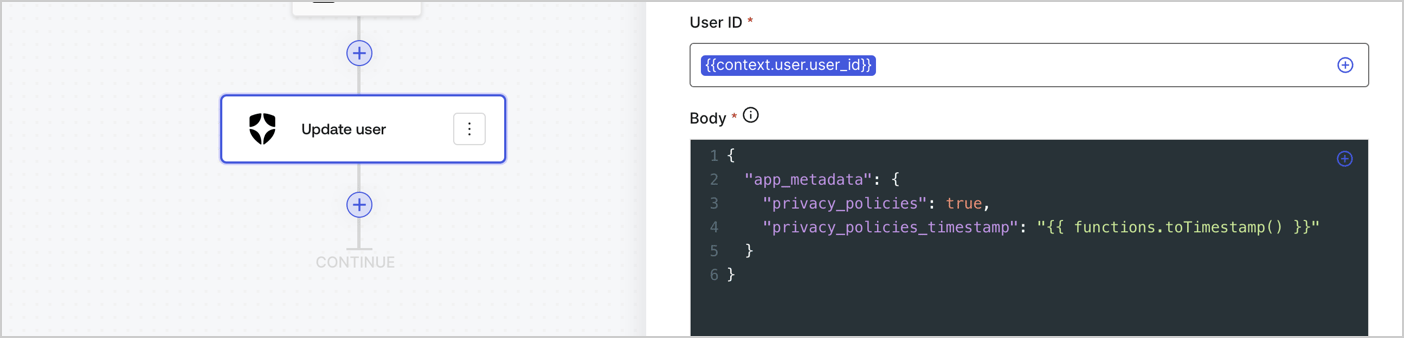
Add an Auth0 Update user action to the flow by following these steps:

1. Select the **Flow** **Update app\_metadata** > **Edit flow** to open the Flow editor in a new tab.
2. Below the StartAction, select the **+** icon to add an **Update user** action. Complete the fields below, then select **Save** to continue.

   * **Connection**: Select from the dropdown the Vault connection to your M2M application.

   * **User ID**: Enter `{{context.user.user_id}}`.

   * **Body**: Copy and paste the following code to update the app\_metadata with the privacy\_policies and privacy\_policies\_timestamp properties.

     ```text lines theme={null}
     {
       "app_metadata": {
         "privacy_policies": true,
         "privacy_policies_timestamp": "{{ functions.toTimestamp() }}"
       }
     }
     ```

   * Select **Save**.
3. Select **Publish** to save.
<Frame>
  <img src="https://mintcdn.com/docs-dev-actions-transaction-metadata/1Rq5AgUNyCJbSDw9/docs/images/cdy7uua7fh8z/CvMNIwWrOUwaFW4X3G28p/1fb70ae57a20749d9ffaaba8dc0b7e26/update-user-privacy.png?fit=max&auto=format&n=1Rq5AgUNyCJbSDw9&q=85&s=c1c011750c8d17c5473dc5d034423889" alt="Dashboard > Actions > Forms > User case privacy policy code" data-og-width="1404" width="1404" data-og-height="338" height="338" data-path="docs/images/cdy7uua7fh8z/CvMNIwWrOUwaFW4X3G28p/1fb70ae57a20749d9ffaaba8dc0b7e26/update-user-privacy.png" data-optimize="true" data-opv="3" srcset="https://mintcdn.com/docs-dev-actions-transaction-metadata/1Rq5AgUNyCJbSDw9/docs/images/cdy7uua7fh8z/CvMNIwWrOUwaFW4X3G28p/1fb70ae57a20749d9ffaaba8dc0b7e26/update-user-privacy.png?w=280&fit=max&auto=format&n=1Rq5AgUNyCJbSDw9&q=85&s=debc6e454d7bd7ce119cd37b8d1df4f7 280w, https://mintcdn.com/docs-dev-actions-transaction-metadata/1Rq5AgUNyCJbSDw9/docs/images/cdy7uua7fh8z/CvMNIwWrOUwaFW4X3G28p/1fb70ae57a20749d9ffaaba8dc0b7e26/update-user-privacy.png?w=560&fit=max&auto=format&n=1Rq5AgUNyCJbSDw9&q=85&s=f9c16fd72536882e7df7c6de495a1c20 560w, https://mintcdn.com/docs-dev-actions-transaction-metadata/1Rq5AgUNyCJbSDw9/docs/images/cdy7uua7fh8z/CvMNIwWrOUwaFW4X3G28p/1fb70ae57a20749d9ffaaba8dc0b7e26/update-user-privacy.png?w=840&fit=max&auto=format&n=1Rq5AgUNyCJbSDw9&q=85&s=fb7a33883f54e08c4226ea754d21fad6 840w, https://mintcdn.com/docs-dev-actions-transaction-metadata/1Rq5AgUNyCJbSDw9/docs/images/cdy7uua7fh8z/CvMNIwWrOUwaFW4X3G28p/1fb70ae57a20749d9ffaaba8dc0b7e26/update-user-privacy.png?w=1100&fit=max&auto=format&n=1Rq5AgUNyCJbSDw9&q=85&s=9d59b9e9c55302eb909391c2fb92ff39 1100w, https://mintcdn.com/docs-dev-actions-transaction-metadata/1Rq5AgUNyCJbSDw9/docs/images/cdy7uua7fh8z/CvMNIwWrOUwaFW4X3G28p/1fb70ae57a20749d9ffaaba8dc0b7e26/update-user-privacy.png?w=1650&fit=max&auto=format&n=1Rq5AgUNyCJbSDw9&q=85&s=eb4f4764acca4603a015f9f78c746ae9 1650w, https://mintcdn.com/docs-dev-actions-transaction-metadata/1Rq5AgUNyCJbSDw9/docs/images/cdy7uua7fh8z/CvMNIwWrOUwaFW4X3G28p/1fb70ae57a20749d9ffaaba8dc0b7e26/update-user-privacy.png?w=2500&fit=max&auto=format&n=1Rq5AgUNyCJbSDw9&q=85&s=cfecbb9b1dbc7a0249c0474730834ac5 2500w" />
</Frame>

<Callout icon="file-lines" color="#0EA5E9" iconType="regular">
  The flow **Update app\_metadata** adds a `privacy_policies true` value to the app`_metadata` object and also generates a timestamp with a [helper function.](/docs/customize/forms/variables)
</Callout>

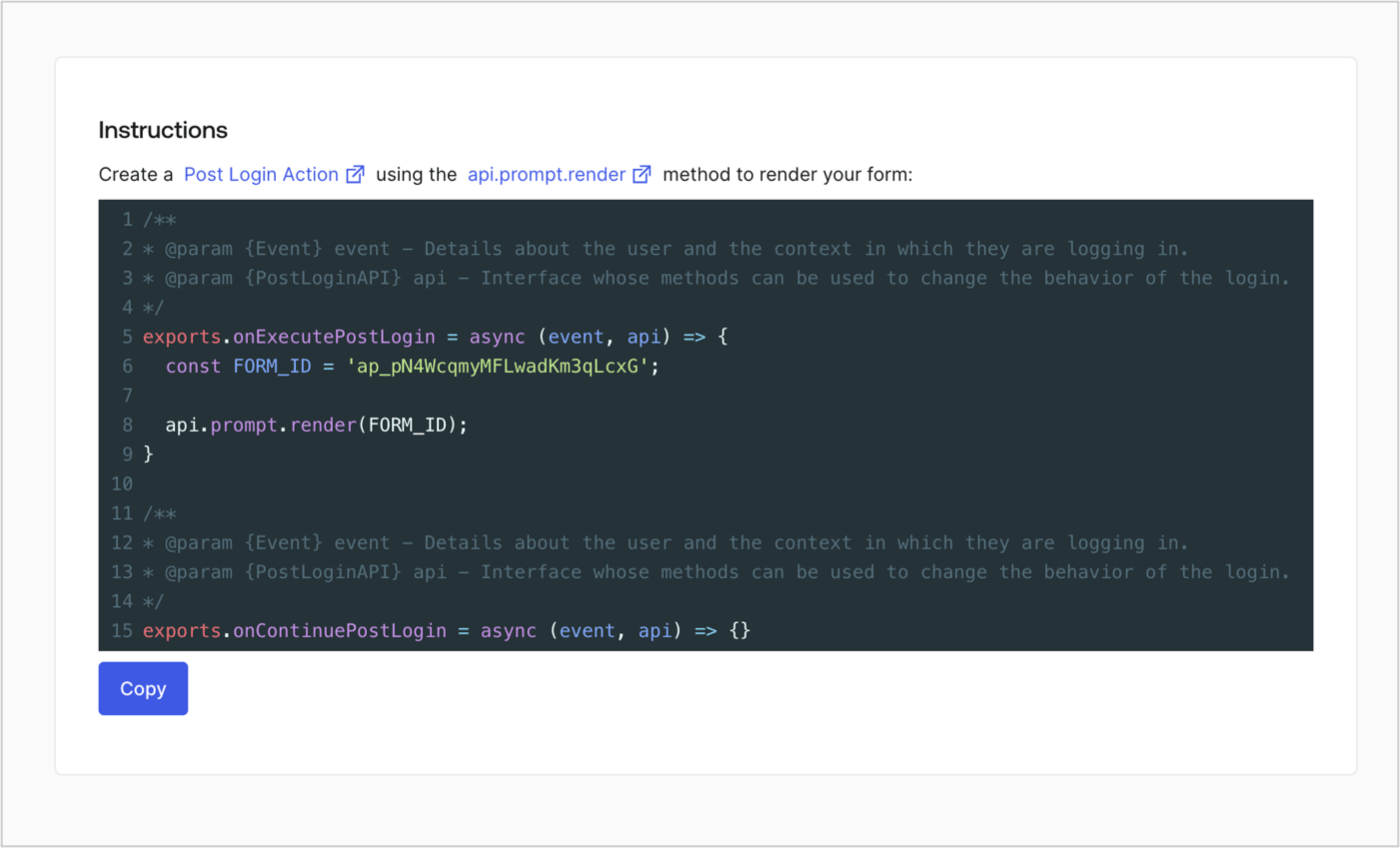
## Retrieve the form render code

Retrieve your form render code to visually render the form with a custom Post Login Action by following these steps:

* From the Form editor, select **`<> Render`**.
* Select **Copy**.
<Frame>
  <img src="https://mintcdn.com/docs-dev-actions-transaction-metadata/IUlT13x1ZjneOkWp/docs/images/cdy7uua7fh8z/2EIUzc539sq9lwoTKbjoJv/496a864c0fc44a782c9cadca119dbfb0/embed.png?fit=max&auto=format&n=IUlT13x1ZjneOkWp&q=85&s=187f381e6ac965399dbcd1f6da142b0a" alt="Dashboard > Actions > Forms > Form > Embed" data-og-width="1400" width="1400" data-og-height="848" height="848" data-path="docs/images/cdy7uua7fh8z/2EIUzc539sq9lwoTKbjoJv/496a864c0fc44a782c9cadca119dbfb0/embed.png" data-optimize="true" data-opv="3" srcset="https://mintcdn.com/docs-dev-actions-transaction-metadata/IUlT13x1ZjneOkWp/docs/images/cdy7uua7fh8z/2EIUzc539sq9lwoTKbjoJv/496a864c0fc44a782c9cadca119dbfb0/embed.png?w=280&fit=max&auto=format&n=IUlT13x1ZjneOkWp&q=85&s=e6c24d7ff312ba480d9bac9ed8e4e789 280w, https://mintcdn.com/docs-dev-actions-transaction-metadata/IUlT13x1ZjneOkWp/docs/images/cdy7uua7fh8z/2EIUzc539sq9lwoTKbjoJv/496a864c0fc44a782c9cadca119dbfb0/embed.png?w=560&fit=max&auto=format&n=IUlT13x1ZjneOkWp&q=85&s=ea1d2c1d45f6358973c8cef3c91127c4 560w, https://mintcdn.com/docs-dev-actions-transaction-metadata/IUlT13x1ZjneOkWp/docs/images/cdy7uua7fh8z/2EIUzc539sq9lwoTKbjoJv/496a864c0fc44a782c9cadca119dbfb0/embed.png?w=840&fit=max&auto=format&n=IUlT13x1ZjneOkWp&q=85&s=50c002c69aa7534d642847f11762bf6e 840w, https://mintcdn.com/docs-dev-actions-transaction-metadata/IUlT13x1ZjneOkWp/docs/images/cdy7uua7fh8z/2EIUzc539sq9lwoTKbjoJv/496a864c0fc44a782c9cadca119dbfb0/embed.png?w=1100&fit=max&auto=format&n=IUlT13x1ZjneOkWp&q=85&s=c5de6775d10cd21677aa30ea65ed8170 1100w, https://mintcdn.com/docs-dev-actions-transaction-metadata/IUlT13x1ZjneOkWp/docs/images/cdy7uua7fh8z/2EIUzc539sq9lwoTKbjoJv/496a864c0fc44a782c9cadca119dbfb0/embed.png?w=1650&fit=max&auto=format&n=IUlT13x1ZjneOkWp&q=85&s=8018053bb0a034755dc15c4727a1afff 1650w, https://mintcdn.com/docs-dev-actions-transaction-metadata/IUlT13x1ZjneOkWp/docs/images/cdy7uua7fh8z/2EIUzc539sq9lwoTKbjoJv/496a864c0fc44a782c9cadca119dbfb0/embed.png?w=2500&fit=max&auto=format&n=IUlT13x1ZjneOkWp&q=85&s=273a92960fa4fd40d133c991f0aaa2e0 2500w" />
</Frame>

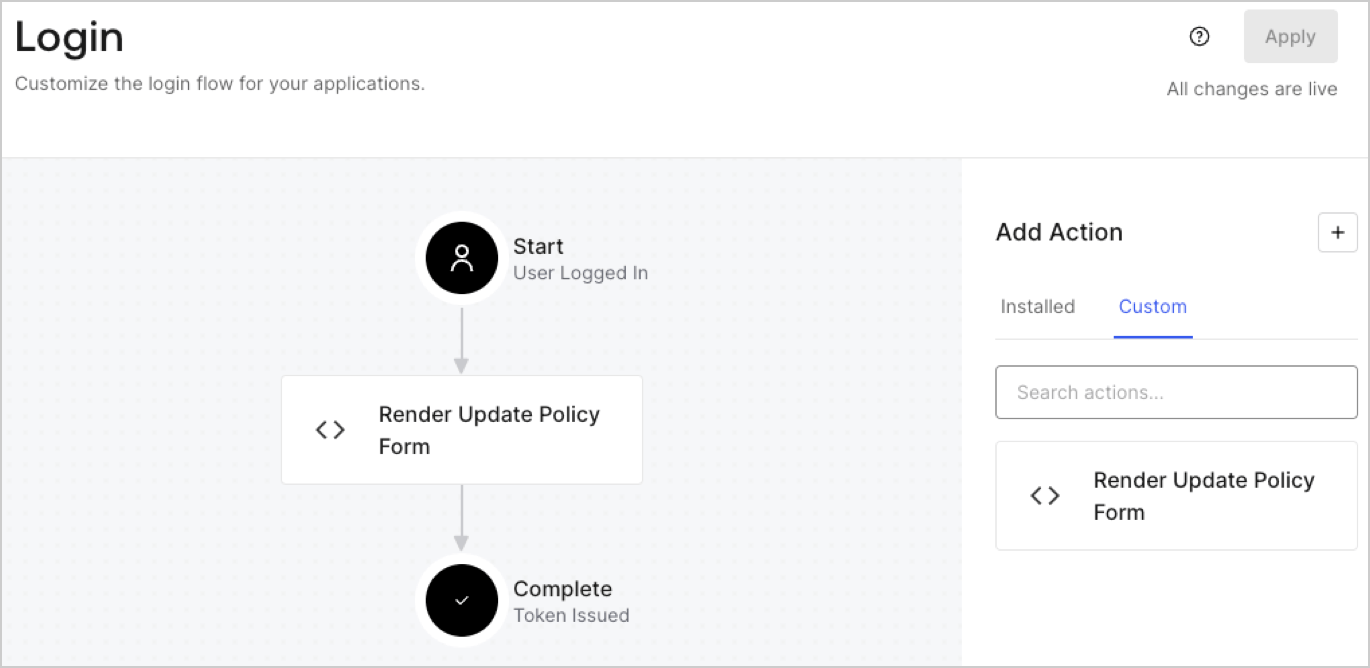
## Create a Post Login Action

Create a post-login Action to render your form by following these steps:

1. Navigate to **Auth0 Dashboard > Actions > Flows > Login.**
2. Select the **+** icon and Select **Build from scratch**:

   * **Name**: Enter `Render Update Policy Form`.
   * **Trigger**: Select `Login / Post Login`.
   * **Runtime**: Select the recommended version.
3. Select **Create**.

To configure the post-login Action:

1. Delete the existing code from the Code editor.
2. Paste the form render code into the Code editor.
3. Edit the code to define the conditional logic that will render the form.

   ```javascript lines theme={null}
   /**
   * @param {Event} event - Details about the user and the context in which they are logging in.
   * @param {PostLoginAPI} api - Interface whose methods can be used to change the behavior of the login.
   */
   exports.onExecutePostLogin = async (event, api) => {
     const FORM_ID = 'REPLACE_WITH_YOUR_FORM_ID';

     if (event.user.app_metadata.privacy_policies !== true) {
       api.prompt.render(FORM_ID);
     }
   }

   exports.onContinuePostLogin = async (event, api) => { }
   ```

   <Callout icon="file-lines" color="#0EA5E9" iconType="regular">
     The example code above will render the form when a user is missing the app metadata `privacy_policies` property.
   </Callout>
4. Select **Deploy.**
5. Drag and Drop the **Render Update Policy Form** Action to the **Login** flow.
   <Frame>
     <img src="https://mintcdn.com/docs-dev-actions-transaction-metadata/OzJK_TAcTCudDY1x/docs/images/cdy7uua7fh8z/5TOwDgevZsBqd7yZynUYWU/41ca909dc3007aed4f40ff794a05efa5/postlogin.png?fit=max&auto=format&n=OzJK_TAcTCudDY1x&q=85&s=e3bd557cef1776783afd9f9890f7f340" alt="Dashboard > Forms > Use Case > Render update policy form login action" data-og-width="1370" width="1370" data-og-height="668" height="668" data-path="docs/images/cdy7uua7fh8z/5TOwDgevZsBqd7yZynUYWU/41ca909dc3007aed4f40ff794a05efa5/postlogin.png" data-optimize="true" data-opv="3" srcset="https://mintcdn.com/docs-dev-actions-transaction-metadata/OzJK_TAcTCudDY1x/docs/images/cdy7uua7fh8z/5TOwDgevZsBqd7yZynUYWU/41ca909dc3007aed4f40ff794a05efa5/postlogin.png?w=280&fit=max&auto=format&n=OzJK_TAcTCudDY1x&q=85&s=ad5fe22c7588ca19b38c6af4f4756cd1 280w, https://mintcdn.com/docs-dev-actions-transaction-metadata/OzJK_TAcTCudDY1x/docs/images/cdy7uua7fh8z/5TOwDgevZsBqd7yZynUYWU/41ca909dc3007aed4f40ff794a05efa5/postlogin.png?w=560&fit=max&auto=format&n=OzJK_TAcTCudDY1x&q=85&s=67969d0530b856dfec8549e731dca3c2 560w, https://mintcdn.com/docs-dev-actions-transaction-metadata/OzJK_TAcTCudDY1x/docs/images/cdy7uua7fh8z/5TOwDgevZsBqd7yZynUYWU/41ca909dc3007aed4f40ff794a05efa5/postlogin.png?w=840&fit=max&auto=format&n=OzJK_TAcTCudDY1x&q=85&s=2d3a5028036632f68f684921687ba041 840w, https://mintcdn.com/docs-dev-actions-transaction-metadata/OzJK_TAcTCudDY1x/docs/images/cdy7uua7fh8z/5TOwDgevZsBqd7yZynUYWU/41ca909dc3007aed4f40ff794a05efa5/postlogin.png?w=1100&fit=max&auto=format&n=OzJK_TAcTCudDY1x&q=85&s=e7d76c12d67f6f2f990340731284958c 1100w, https://mintcdn.com/docs-dev-actions-transaction-metadata/OzJK_TAcTCudDY1x/docs/images/cdy7uua7fh8z/5TOwDgevZsBqd7yZynUYWU/41ca909dc3007aed4f40ff794a05efa5/postlogin.png?w=1650&fit=max&auto=format&n=OzJK_TAcTCudDY1x&q=85&s=d38e229d1d5aa122a8b808cd26b32423 1650w, https://mintcdn.com/docs-dev-actions-transaction-metadata/OzJK_TAcTCudDY1x/docs/images/cdy7uua7fh8z/5TOwDgevZsBqd7yZynUYWU/41ca909dc3007aed4f40ff794a05efa5/postlogin.png?w=2500&fit=max&auto=format&n=OzJK_TAcTCudDY1x&q=85&s=2840ea805f7fa12e7ccd8b6b595a463b 2500w" />
   </Frame>
6. Select **Apply.**

### Test implementation

Test the implementation by following these steps:

1. Log in with an existing user whose app`_metadata` attribute `privacy_policies` does not have a value.
2. The post-login Action in the Login flow will render the form and prompt for acceptance.
3. Select **Auth0 Dashboard > User Management > Users,** locate the user and verify that the `app_metadata` attribute `privacy_policies` contains a `true` value and a timestamp.
